
FaceFusion vs DeepfakesWeb
We tested both tools with real data. One is free and packed with features. The other charges $10 per video and intentionally limits quality. Here's the full breakdown.
Price Per Video
$0
FaceFusion
$10
DeepfakesWeb
Feature Modules
11
FaceFusion
1
DeepfakesWeb
AI Models
80+
FaceFusion
N/A
DeepfakesWeb
Searching for an honest FaceFusion vs DeepfakesWeb comparison? This page covers features, pricing, privacy, and quality with real numbers, real user reviews, and no affiliate bias. Updated March 2026.
Quick Verdict
The Results at a Glance
We scored both tools across five key dimensions based on official documentation and verified user reviews. Here's the breakdown.
FaceFusion
The clear winner across every dimension
80+ AI models, 4K + 8x upscale, zero watermarks, RGB-accurate encoding
100% local processing - your data never leaves your device
Completely free, no credits, no expiration, no account required
11 modules: swap, enhance, lip sync, age mod, upscale, colorize, and more
Hardware-dependent locally; our online version handles GPU for you
DeepfakesWeb
Overpriced and underperforming
Officially admits to intentionally limiting quality and adding imperfections
Cloud upload required, server location undisclosed, vague data retention
$10 per video, no free trial, credits expire in 6 months, no refunds
Single function only, 1 undisclosed model, MP4 only
Claims under 10 minutes but the real pipeline can take 45 to 60 minutes
Side-by-Side Output Comparison
Scoring based on official documentation, verified user reviews from Trustpilot, 99consumer, and major AI tool review sites. FaceFusion scored highest on privacy and value. DeepfakesWeb scored lowest on features and value.
Pricing Comparison
The Price Difference Will Shock You
FaceFusion is completely free. DeepfakesWeb charges $10 for every single video. For anyone making more than a handful of videos, the savings are enormous.
FaceFusion
per video
Unlimited videos. Always free. No credit card.
DeepfakesWeb
per video
No free trial. Credits expire. No refund after generation.
Total Cost at Different Scales
| Videos Made | FaceFusion | DeepfakesWeb | You Save |
|---|---|---|---|
| 1 video | $0 | $10 | $10 |
| 5 videos | $0 | $50 | $50 |
| 10 videos | $0 | $100 | $100 |
| 50 videos | $0 | $500 | $500 |
| 100 videos | $0 | $1,000 | $1,000 |
What This Means in Practice
If you're a content creator producing 5 face swap videos per week, DeepfakesWeb would cost you $200 per month or $2,400 per year. That's enough to buy a dedicated GPU workstation that could run FaceFusion locally forever. With our online version, the cost is still $0.
Even casual users feel the sting. Want to test different AI models or angles to get the best result? Each attempt on DeepfakesWeb burns another $10 credit whether the output is good or not. With FaceFusion, you can experiment freely and only keep the result you love.
DeepfakesWeb's Pricing History - It Keeps Getting Worse
DeepfakesWeb did not always charge $10 per video. Earlier versions offered a Basic free tier, a Premium plan at $19/month, and separate cloud GPU credits at $4/hour. Over time, they removed the free tier, consolidated into a per-video credit model, and raised the effective price.
The trend is clear: prices go up, features stay the same, and the free option disappears. Meanwhile, FaceFusion has been free since day one and, as an open-source project, is not going anywhere.
And Then There Are the Hidden Traps
No free trial
DeepfakesWeb says GPU costs are too high to offer free video generation. You pay upfront with no way to test the quality first.
Credits expire in 6 months
Buy credits but do not use them all? They disappear after 6 months. No rollover and no refund for unused credits.
No refund after generation
Once the AI processes your video, even if the result is terrible, you cannot get your $10 back.
Unauthorized charges reported
Multiple verified Trustpilot reviews describe unexpected $9/month charges appearing months after a single purchase.
Full Feature Comparison
11 Feature Modules vs 1
A complete breakdown of every feature, format, and capability checked against official documentation and verified user reports. No guesswork, no filler.
The Real Gap Is Not in Numbers - It Is in What You Can Do
The biggest difference between FaceFusion and DeepfakesWeb is not just 11 features versus 1. It is the type of features. FaceFusion offers face enhancement, expression restoration, age modification, lip sync, background removal, black-and-white video colorization, and live webcam processing. Each module works independently or in combination. DeepfakesWeb does exactly one thing: basic face swap.
Format Flexibility vs Format Lock-in
DeepfakesWeb only accepts MP4 files and only outputs MP4. If your source footage is in MKV, MOV, AVI, or WebM, you need to convert it first and hope the conversion does not degrade quality. FaceFusion accepts 9 video formats natively and offers 14 output encoders, including professional-grade options like ProRes and H.265.
The 80+ Model Advantage
Different AI models produce different results. Some excel at photorealism, others at difficult angles or lighting conditions. FaceFusion gives you access to 80+ models, including dedicated face swap, face enhancement, upscaling, and celebrity deep swap models. DeepfakesWeb uses a single undisclosed model.
Core Features
Face Swap
Yes - 13 AI models
Yes - 1 model (undisclosed)
Lip Sync - match mouth to audio
Yes
3 models
No
Not available
Age Modification - make faces younger or older
Yes
Slider from -100 to +100
No
Not available
Face Enhancement - fix blurry or low-res faces
Yes
9 enhancement models
No
Not available
Frame Upscaling - boost video resolution
Yes - up to 8x
20 upscaling models
No
Not available
Expression Restore - preserve a natural look
Yes
Live Portrait AI
No
Not available
Background Removal
Yes
15 models
No
Not available
Black & White Video Colorization
Yes
5 colorizer models
No
Not available
Live Webcam / Real-time Processing
Yes
Local and remote cameras
No
Not available
Celebrity Deep Swap Models
Yes - 160+ models
Pre-trained named models
No
Not available
Total Feature Modules
11
1
Total AI Models Available
80+
Unknown
Video & Format Specs
Video Formats Accepted
9 formats
AVI, MKV, MOV, MP4, WebM, MPEG, MXF, M4V, WMV
MP4 only
Only .mp4 files accepted
Maximum Output Resolution
4K + 8x upscale
Goes beyond 4K with frame enhancer
4K (paid plan only)
Basic mode auto-shrinks to 1440px wide
Video Length Limit
No limit
Process any duration
Max 5 minutes
150s on free / 300s on paid plan
Batch Processing
Yes - unlimited
Full job queue system
Max 5 at once
Paid plan required
Output Encoders Available
14 options
H.264, H.265, WebM, ProRes, VP9, and more
MP4 only
Quality & Output
Watermark on output
None
Clean, watermark-free output
Yes (hidden)
All outputs contain digital watermark plus intentional flaws
Quality policy
Always best possible
Open source, community-driven improvements
Intentionally limited
Official docs: "we intentionally don't push limits"
Pixel Boost - resolution enhancement
Yes - up to 1024px
No
Facial Landmark Detection
200+ points
Unknown
Color Accuracy (no color shift)
Yes
RGB-accurate encoding
Unknown
Privacy & Security
Where is your data processed?
Your computer
100% local - nothing leaves your device
Their servers
Uploaded to a remote cloud
Does the company see your face or video?
Never
No server involved at all
Yes
All content is uploaded to their infrastructure
Server location disclosed?
N/A (local only)
Not disclosed
Not mentioned in the privacy policy
Personal data collected
None
Name, email, birthday, card
According to their published privacy policy
Data retention period
N/A
Unclear
Not clearly specified in policy
Platform & Pricing
Cost per video
$0 - free forever
$10 per video
Free trial available?
Yes - always free
No credit card, no account
No
"GPU costs too high for free generation"
Account / login required?
No
Yes
Works on Windows / Mac / Linux
Yes - all platforms
Yes - browser based
Open source / auditable code?
Yes - 27K+ GitHub stars
Full source code available
No - proprietary
Data sourced from FaceFusion's official documentation, DeepfakesWeb documentation, and verified user reviews from Trustpilot and 99consumer. Last checked March 2026.
Privacy & Data Security
Your Face. Who Sees It?
Face data is among the most sensitive personal information you have. It is biometric, unique to you, and unlike a password, you cannot change it if it is misused.
FaceFusion
100% Local
Everything happens on your own computer. Your face, your video, and your results never leave your device.
Processed entirely on your computer with zero server involvement
No uploads, no account, no behavior tracking
Open source code so anyone can inspect exactly what it does
NSFW detection can run locally too
DeepfakesWeb
Cloud Upload
Your face and video are uploaded to remote servers. The company processes them on hardware you cannot see or audit.
Server location is not disclosed in the privacy policy
Data retention period is not clearly specified
Collects your name, birthdate, email, and credit card information
Uses Google Analytics, so your behavior is tracked and shared
Who Is Behind DeepfakesWeb?
DeepfakesWeb is registered as a company in Japan, with legal disputes falling under the Tokyo District Court. That matters because many of its users are in the US and Europe.
Their data retention policy is also vague. Past research suggested that free-tier data could be retained for 15 days while paid-user data might be kept permanently, but the current privacy policy does not clearly state this.
DeepfakesWeb also accepts cryptocurrency payments, giving the company more anonymity while collecting your biometric face data.
Why This Matters More Than It Seems
When a service does not disclose where servers are located or how long it keeps your data, you genuinely do not know what happens to your face after upload. With FaceFusion, that problem disappears because your data never leaves your computer in the first place.
Quality Comparison
One Tool Pushes Every Limit.
The Other Doesn't Even Try.
Quality is not just about resolution. It is also about intent. One of these companies openly admits that it deliberately limits output quality.
DeepfakesWeb's own words from official documentation
“We intentionally don't push limits in our deepfake product, we on purpose include minor imperfections so that AI generated content can be recognized.”
DeepfakesWeb official documentation
In plain English: they are deliberately making a worse product, then charging you $10 for it.
Side-by-Side Output Comparison
The Processing Time Gap They Do Not Advertise
DeepfakesWeb's homepage claims processing takes under 10 minutes. Their own technical documentation points to a much longer pipeline that adds up to 45 to 60 minutes per video.
FaceFusion's speed depends on your hardware when running locally, but our online version handles the GPU work for you. Either way, you are not paying $10 to wait nearly an hour for a result you cannot preview or refund.
FaceFusion Quality Stats
- 80+AI models to choose from, each optimized for different styles and results
- 4K + 8xMaximum output that can go beyond the original source quality
- 0Watermarks on your output
- 200+Facial landmarks detected for precise, natural blending
- OpenQuality ceiling, because community-driven open source keeps improving
Real buyer review - Trustpilot
“Pixelated trash for $15. Looks like 60x50 pixels. Completely unusable. My phone app does a way better job and it is free. Total waste of money.”
Real buyer review - 99consumer
“Spent $30 training the AI model. It returned the original video in lower quality. Zero face swap actually happened. Support never replied.”
DeepfakesWeb has some positive casual reviews, but among buyers expecting real quality, the same complaints keep repeating: poor results, high cost, and no recourse.
Real User Experiences
What Paying Customers Say About DeepfakesWeb
These are verified reviews from real purchasers, not invented examples. The 1-star reviews on Trustpilot and 99consumer tell a very consistent story.
“Pixelated trash for $15. Looks like 60x50 pixels. Completely unusable. My phone app does a way better job for free. Total waste of money.”
Paid $15 for a short video. Quality was described as worse than a free phone app, with no refund.
“Spent $30 training the AI model. It just returned the original video in lower quality and no face swap happened. Customer support never replied.”
Lost $30. The core feature did not work, and support was unresponsive.
“They charged my credit card $9 per month for months without authorization. I never agreed to a subscription.”
Multiple reviews report the same pattern: recurring charges after what users believed was a one-time purchase.
0/5
Overall score on 99consumer
0%
One-star reviews on Trustpilot
$0
Cost of FaceFusion for unlimited videos
Community Trust
Why 27,000+ Developers Trust FaceFusion
FaceFusion is not a brand-new startup. It is a battle-tested open-source project with one of the largest AI face swap communities in the world.
0+
GitHub Stars
Developer trust signal
0+
Discord Members
Active community
0+
AI Models
More than most competitors
0
Releases in 6 months
Actively maintained
Not Just Popular - Actively Evolving
FaceFusion shipped 6 major versions in the past 6 months, including v3.6.0 on March 16, 2026. That is a faster release cadence than most commercial software.
Under the hood, FaceFusion supports 9 different GPU acceleration backends: CUDA, TensorRT, ROCm, MIGraphX, CoreML, OpenVINO, QNN, DirectML, and CPU fallback.
Compare that to DeepfakesWeb: a closed-source product with no public changelog, no community input, and no way to verify what is actually running on their servers.
FaceFusion in Action
Getting Started
Try FaceFusion in 3 Steps
The original FaceFusion open-source project requires a technical installation. We solved that. Use the full power of FaceFusion online right now, with no setup required.
Step 01
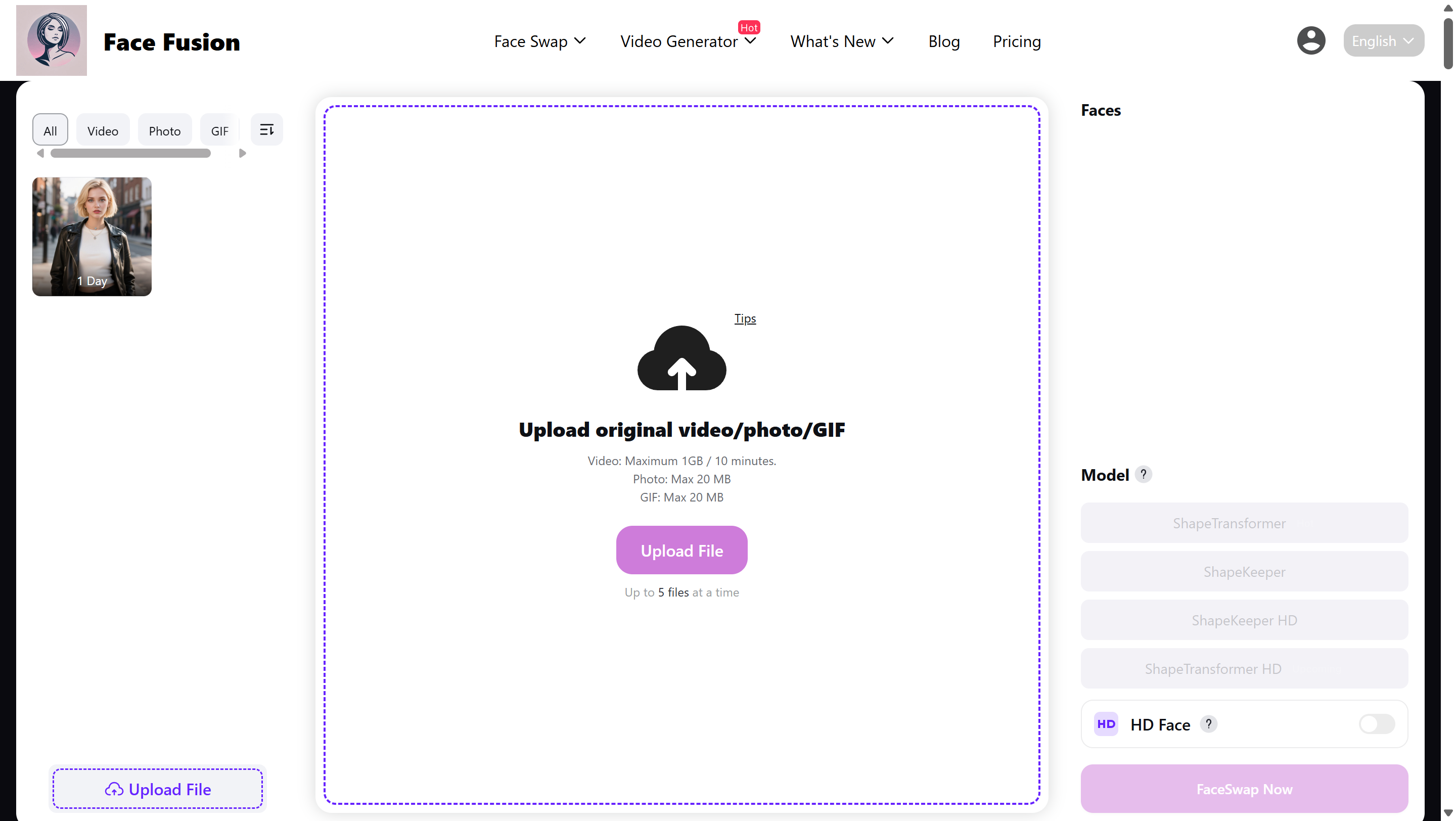
Open the tool - no install needed
Visit our website and access FaceFusion directly in your browser. No software to download, no Python setup, no GPU required on your end.
Step 02
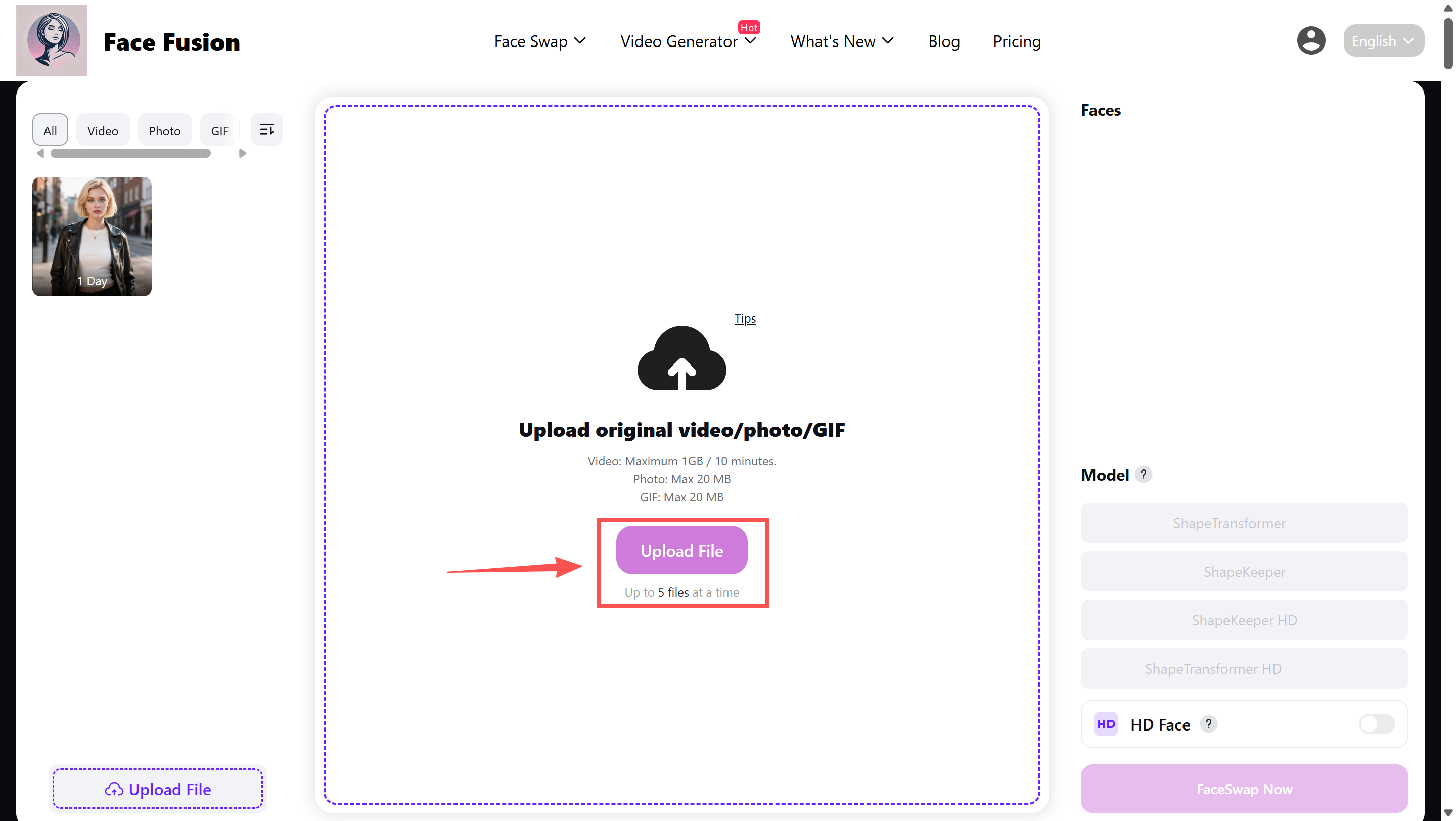
Upload your photo and the target video
Choose the face you want to use and the video you want to apply it to. Supports 9 video formats, including MP4, MKV, and MOV.
Step 03
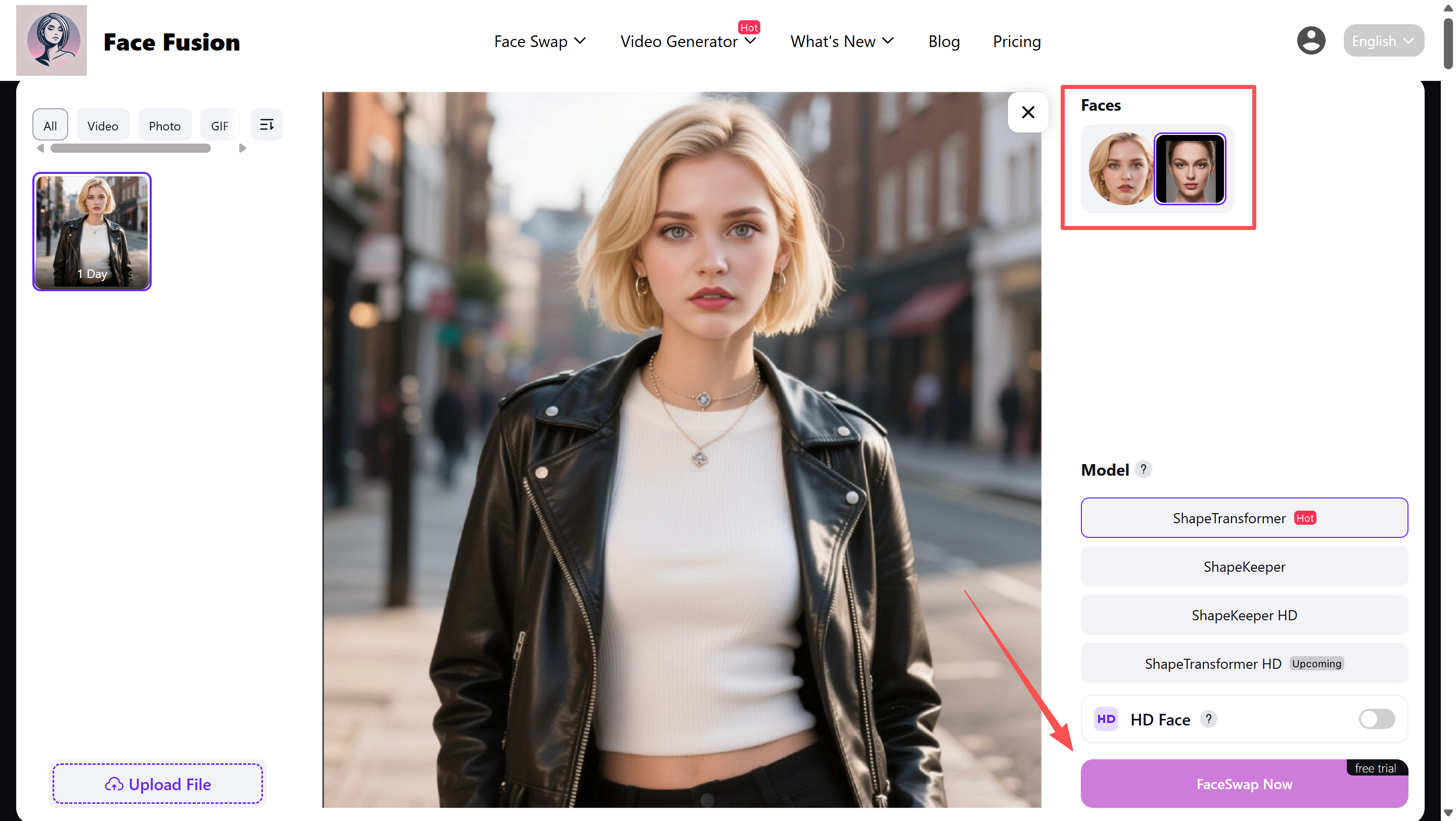
Download your result - free
Our system processes your request using FaceFusion's AI and returns your finished video. No watermark, no hidden fees, no account required.
No account. No credit card. No download required.
FAQ
Common Questions
Everything you need to know about FaceFusion, DeepfakesWeb, and how they compare.
Yes. FaceFusion is 100% free and open source. Our website also lets you use it online without installation, account creation, or payment.
FaceFusion delivers higher quality in most cases. It offers 80+ AI models, 4K output with up to 8x upscaling, and does not deliberately limit quality.
DeepfakesWeb runs everything on cloud GPUs and charges $10 per video. FaceFusion runs locally on your own hardware, or through our online version, which is why the core tool remains free.
That depends on your risk tolerance. DeepfakesWeb uploads your face and video to remote servers, and their privacy policy does not clearly disclose where those servers are or how long your data is retained.
Yes. The open-source project requires installation, but our website provides FaceFusion as a ready-to-use online tool you can open directly in your browser.
FaceFusion supports 9 input video formats including AVI, M4V, MKV, MOV, MP4, MPEG, MXF, WebM, and WMV. It also supports 14 output encoders.
No. FaceFusion produces clean, watermark-free output. DeepfakesWeb embeds an invisible digital watermark and intentional imperfections by design.
DeepfakesWeb previously offered a free tier but later moved to a fully paid model. There is currently no way to test it before paying.
Yes. FaceFusion is free and produces clean, watermark-free output. Its open-source nature also makes hidden modifications easier to verify.
Yes. When you use the open-source version of FaceFusion, processing happens locally on your own computer and your data never touches an external server.
FaceFusion is widely considered one of the best free alternatives because it offers more features, more models, more privacy, and no per-video charge.
The Verdict Is Clear
Stop Paying $10 Per Video
FaceFusion gives you better quality, stronger privacy, 11 feature modules, and 80+ AI models - all completely free.
Try FaceFusion Free Now