
AI Video Face Swap
Video Face SwapOnline, Free, No Watermark.
Drop in a video. Pick a face. Watch the AI swap every frame — matching expressions, lighting, and movement in real time. Free to use, no sign-up, no watermark.
See the Difference
Before & After — Video Face Swap in Action
Drag the slider to compare the original frame with the face-swapped result. What you see is a single frame extracted from a fully processed video — every frame gets this level of precision.
Real Results
What You Can Create with Video Face Swap
Hover to play. Every video below was processed by FaceFusion — no manual editing, no post-production. From 15-second TikToks to 5-minute YouTube videos, this is what creators build every day.
TikTok, Reels & Shorts
Swap yourself into trending dance clips, lip syncs, and challenges. Batch-process multiple templates in one sitting.
Movie Scene Mashups
Put your face into the Titanic. Walk with the Avengers. Our AI handles lighting changes, camera movement, and angle shifts.
Reaction Videos & Memes
Turn classic reaction GIFs and meme templates into personalized content. Share with friends or post to build your meme page.
Sports Highlight Reels
Slam dunk with LeBron. Score a bicycle kick. Swap your face onto athletes and share clips that make your group chat lose it.
Marketing & Ad Creative
Localize video ads without reshooting. Swap talent faces to match regional audiences or create 10 variations from a single shoot.
Gifts & Surprises
Swap a friend into their favorite movie for a birthday. Create video gifts that no one expects and everyone remembers.
Ready to swap faces in your own video?
Try Free Now3 Steps
How to Swap Faces in a Video
No editing skills needed. No software to download. Our AI handles face detection, tracking, and blending automatically.
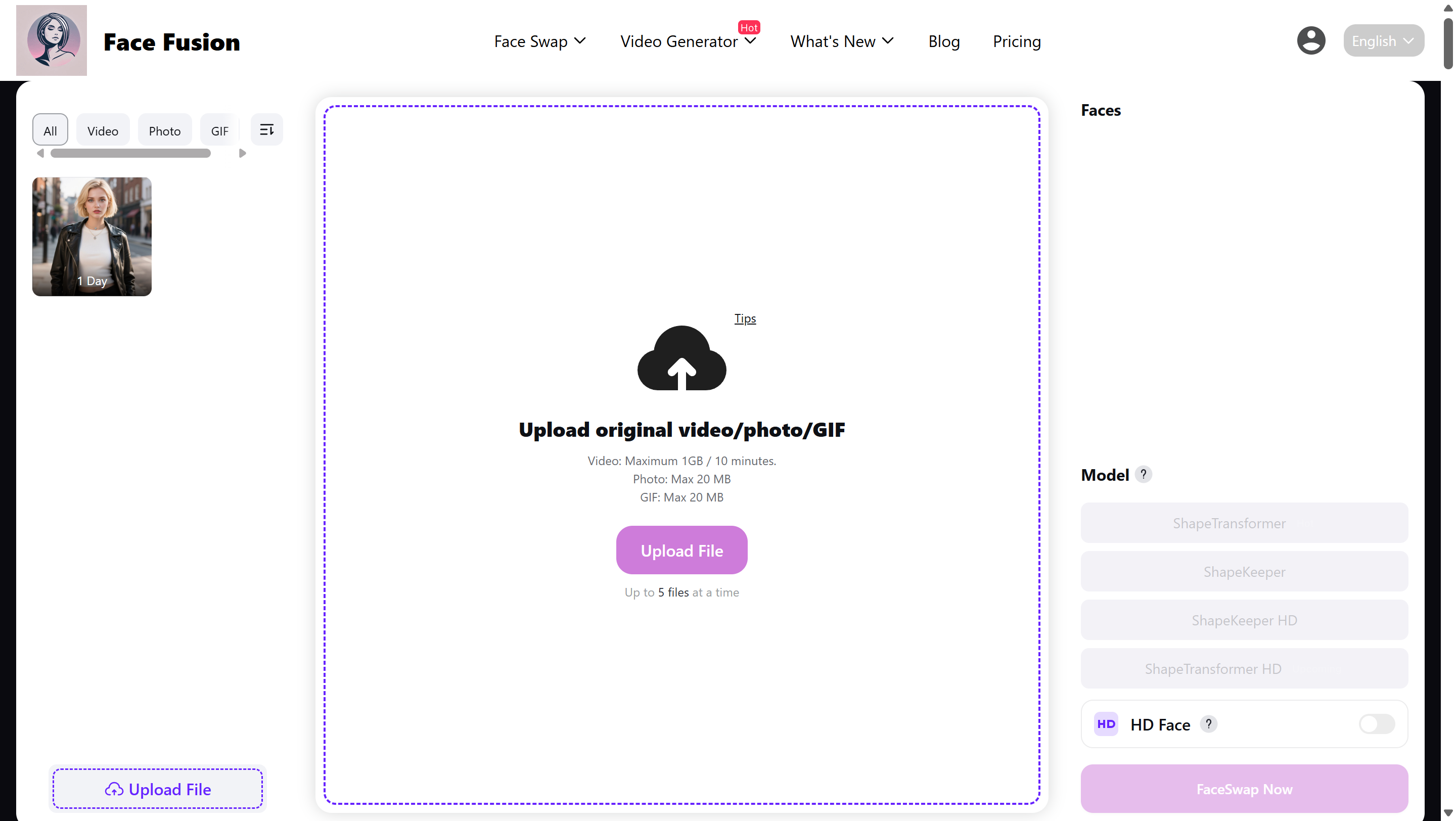
Upload Your Video
Drag and drop any video file — MP4, MOV, AVI, MKV, or 5 other formats. Clips up to 5 minutes, right from your browser.
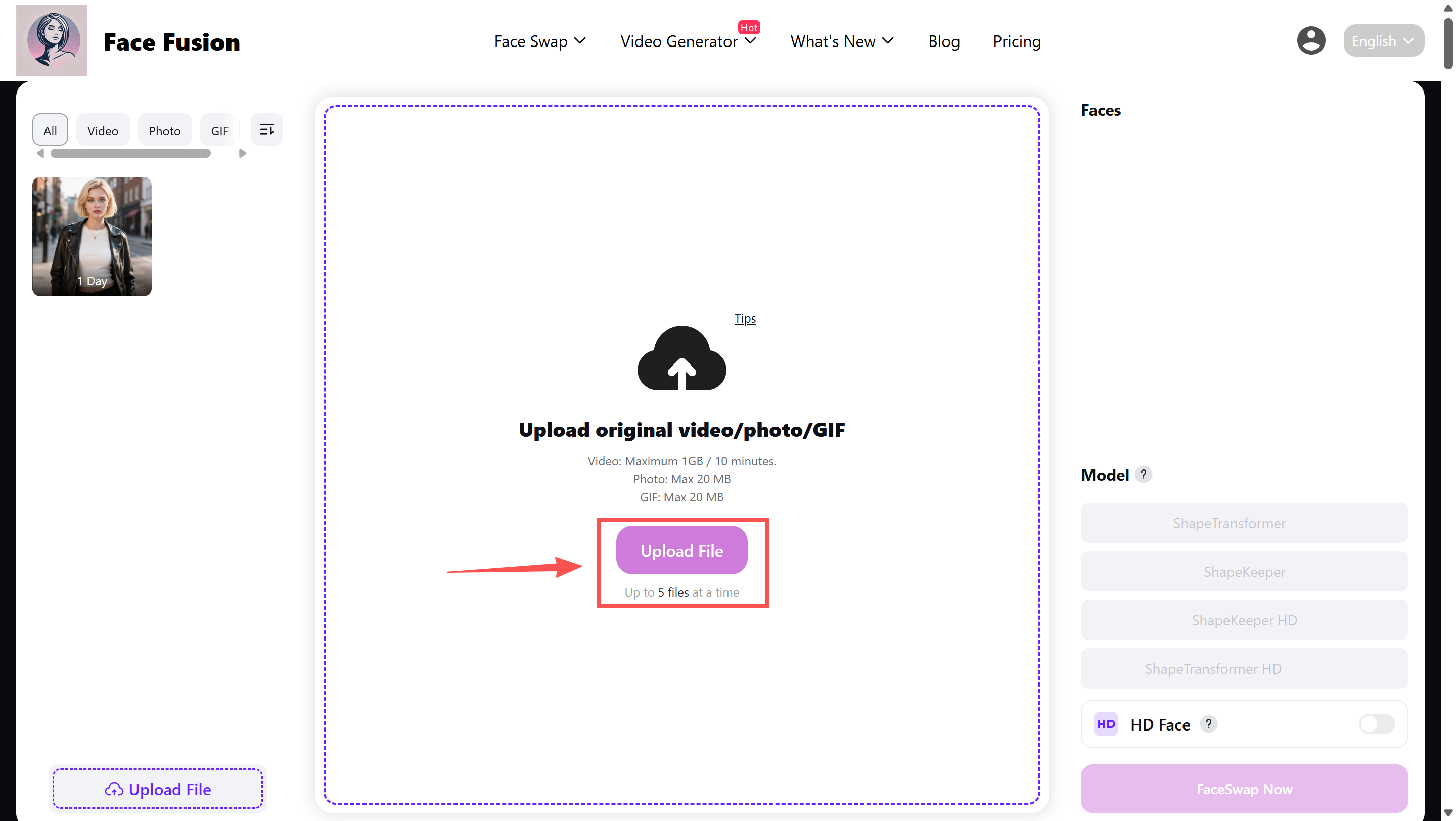
Choose the New Face
Upload a clear photo of the face you want. The AI detects every face in your video and lets you map replacements one by one — or swap all at once.
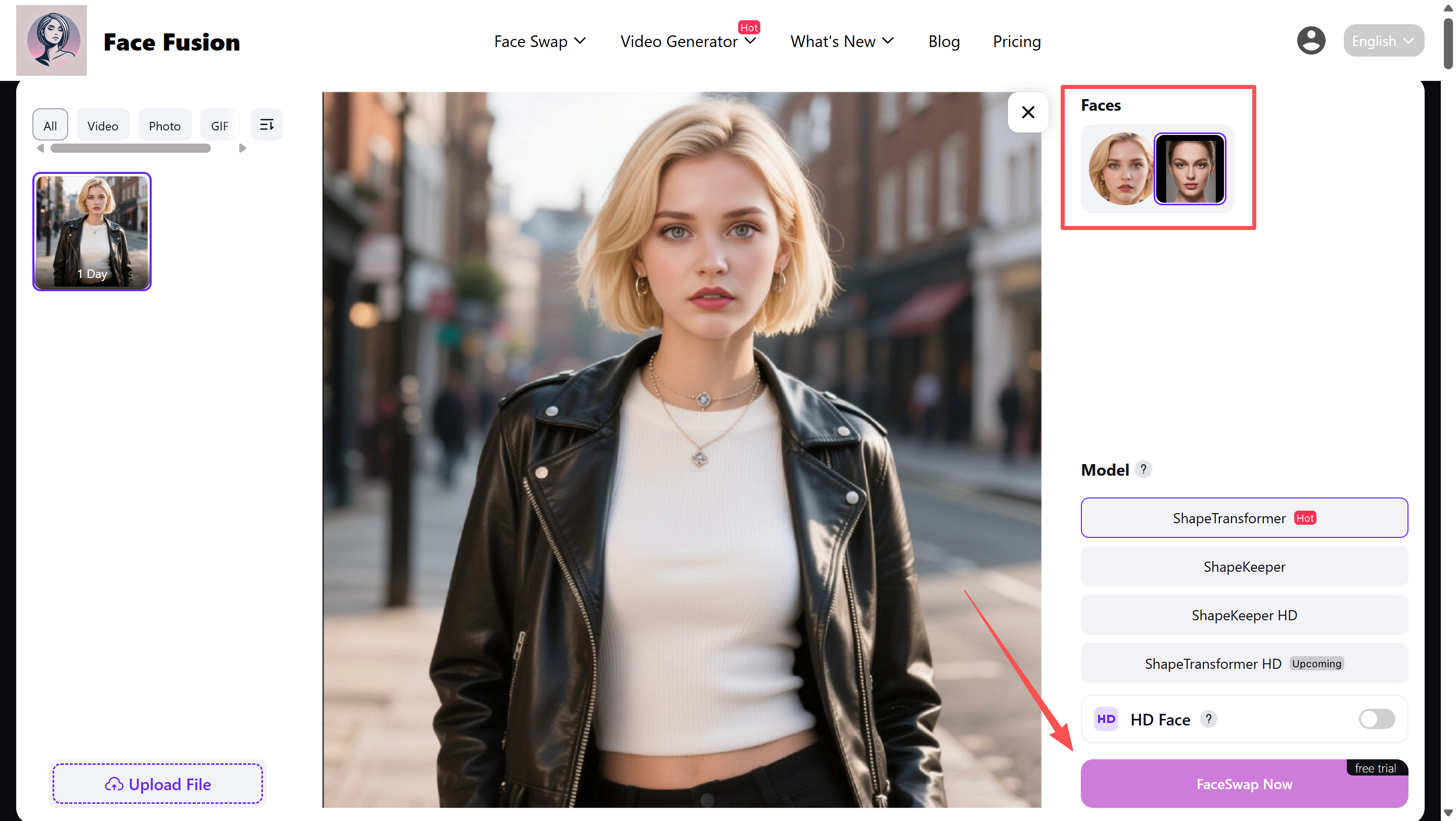
Generate and Download
Hit swap. The AI processes each frame, tracking 478 facial landmarks to keep the result smooth and natural. Download in HD — no watermark, no account needed.
Why FaceFusion
Why Creators Choose FaceFusion for Video Face Swap
Most face swap tools paste a face on top and call it done. FaceFusion rebuilds the face into the scene — matching skin tone, lighting angle, and micro-expressions frame by frame.
Swap Up to 6 Faces at Once
Group video? Interview clip? FaceFusion detects every face in every frame and lets you replace up to 6 simultaneously. Map each face to a different replacement, or apply one face across all. No competitor handles multi-face video this smoothly.
478 Landmarks Per Frame, Zero Flicker
While other tools track 68 facial points, FaceFusion maps 478. That means sharper eye alignment, more natural mouth movement, and none of the frame-to-frame jitter that makes cheap face swaps look fake. Every frame is individually processed, not interpolated.
4K Output with 8x Super-Resolution
Upload a 720p clip and download it in 4K. Our 8x super-resolution engine enhances every pixel of the swapped face while preserving the original video quality around it. The result looks like it was shot in 4K from the start.
9 Video Formats, Zero Conversion
MP4, MOV, AVI, MKV, WMV, WebM, FLV, GIF, TS — upload directly without converting first. Most tools only accept MP4. FaceFusion accepts whatever your camera, phone, or screen recorder produces.
GPU Cloud Processing in Seconds
Your video runs on dedicated GPU clusters, not your laptop. A 30-second clip processes in under a minute. No spinning wheels, no 'estimated 45 minutes remaining' — just fast results delivered to your browser.
No Watermark. No Sign-Up. No Catch.
Your output is clean. No watermark stamped in the corner. No logo overlaid on the video. No account required to start. You get free daily credits, and what you create is entirely yours to download and share.
Ready to swap faces in your own video?
Try Free NowUnder the Hood
The Technology Behind Our Video Face Swap
FaceFusion is built on the same open-source AI engine trusted by researchers and developers worldwide. Here is what makes it different from every other video face swap tool online.
Precision Face Mapping
Most face swap tools rely on 68 landmark points — the bare minimum for face detection. FaceFusion tracks 478 points across each face, capturing the subtle geometry of eyelids, nostrils, lip corners, and jawline contours. This 7x increase in tracking density is why our swaps look real instead of 'pasted on.'
Multi-Model AI Engine
Instead of relying on a single neural network, FaceFusion selects from over 80 specialized AI models depending on the scene. Low light? Side angle? Rapid motion? Each scenario triggers the optimal model combination. This is why FaceFusion handles edge cases that break other tools.
GPU-Accelerated Pipeline
Each video frame passes through a dedicated GPU processing pipeline — face detection, landmark mapping, neural blending, and quality enhancement happen in parallel. This distributed architecture processes a single frame in 0.3 seconds, letting you swap faces in a 30-second video in under a minute.
Neural Face Reconstruction
After the swap, a separate neural network rebuilds the face at up to 8x the original resolution. Pores, hair strands, and skin texture are synthesized to match the target, not just stretched from the source. The result passes as real because it is rebuilt from scratch, pixel by pixel.
Ready to swap faces in your own video?
Try Free NowComparison
FaceFusion vs Real Video Face Swap Competitors
We replaced the generic 'Other Tools' column with public-facing claims from Magic Hour, Higgsfield, AIFaceSwap, and Facy.
| Capability | FaceFusion | Magic Hour | Higgsfield | AIFaceSwap | Facy |
|---|---|---|---|---|---|
| Free entry | Free daily credits | 3 free swaps, no sign-up | NC | 5 free runs/day, no login | Paid video tool (1 credit) |
| Sign-up for basic use | No | No | NC | No for free use | NC |
| Multi-face support | Up to 6 faces | Yes, multi-face in dashboard | NC | Up to 6 faces | Yes, one face or multi-face |
| Max clip length shown publicly | Up to 5 min on free tier | 10 sec on free tool | NC | Long-duration testing shown | Up to 60 min |
| Output quality | 4K + 8x upscale | 576p free / 4K paid | High-fidelity claim | 1080P enhance | High quality / 4K UHD paid |
| Supported video inputs | 9 formats | MP4 / MOV / WEBM / YouTube URL | NC | M4V / MP4 / MOV / WEBM | MP4 / MOV / AVI / MKV / WEBM |
| Public speed claim | Under 60s for a 30s clip | Under 30s typical | 30 sec to 2 min | Queue shown / VIP faster | Short clips often minutes |
| Watermark | None | Free yes / paid no | NC | No watermark | NC |
| File retention | 24h auto-delete | 1 day | NC | 2 days | 48 hours |
| Main public angle | Open-source engine + 80+ models | API + enterprise teams | Character Swap positioning | Templates + no-watermark angle | Long-video support |
Reviews
What Users Say About FaceFusion Video Face Swap
Real feedback from creators who use FaceFusion to swap faces in their videos.
“I tested every video face swap tool out there before finding FaceFusion. The difference is night and day — especially on side-angle shots. Other tools completely fall apart when the face turns, but FaceFusion tracks it perfectly. I use it for 3-4 videos a week now.”
Alex Rivera
TikTok Creator, 850K followers
“We needed to localize ad creatives for 6 markets without reshooting. FaceFusion let us swap presenter faces in under an hour. The multi-face feature saved us — our original ad had 3 people in it, and every tool we tried before could only handle one face at a time.”
Sarah Chen
Social Media Manager at a DTC brand
“The 478 landmark tracking is not just a marketing number. I can actually see the difference — the eyes and mouth line up frame by frame with zero flicker. My movie mashup series doubled in views because viewers stopped noticing the face swap and started watching the content.”
James Okonkwo
YouTuber, 120K subscribers
“What sold me was the format support. My clients send videos in every format imaginable — MKV, MOV, AVI, you name it. Every other tool made me convert to MP4 first. FaceFusion just accepts whatever I throw at it. That alone saves me 20 minutes per project.”
Maria Santos
Freelance Video Editor
“I do not have a budget for video production tools. FaceFusion gives me free daily credits, no watermark, and no sign-up wall. I created a face swap montage for a class project in 30 minutes. My professor thought I used After Effects.”
David Kim
Marketing Student
“The 4K output with super-resolution is unreal. I uploaded a 720p clip from 2015 and the face swap came back sharper than the original video. I run a meme page with 200K followers and FaceFusion is now my primary tool for video memes. Fast, clean, no watermark.”
Priya Sharma
Digital Artist & Meme Creator
FAQ
Video Face Swap — Frequently Asked Questions
Everything you need to know about using AI to swap faces in videos.
Video face swap is an AI-powered technique that replaces one person's face in a video with another face from a photo. Unlike photo face swap, video face swap processes every frame individually — detecting facial positions, matching expressions and lighting, and blending the new face seamlessly across the entire clip. The result looks natural because the AI tracks movement, angle changes, and micro-expressions in real time.
Yes. FaceFusion gives you free daily credits to swap faces in videos — no credit card, no sign-up, no hidden fees. Your free credits refresh every 24 hours. Paid plans are available for heavy users who need more credits, higher resolution output, and priority processing, but the free tier has no watermark and no quality restrictions.
Three steps: upload your video to FaceFusion (drag and drop, any format), upload a clear face photo, and click Generate. The AI processes every frame automatically. No account, no app download, no editing skills required. Your face-swapped video downloads in HD, watermark-free, in under a minute for most clips.
FaceFusion supports 9 video formats: MP4, MOV, AVI, MKV, WMV, WebM, FLV, GIF, and TS. Upload directly from your camera, phone, screen recorder, or editing software without converting first. Most competing tools only accept MP4, which means extra steps before you can start.
Free users can upload videos up to 5 minutes long. For longer content, paid plans support extended video lengths. We recommend keeping clips under 2 minutes for the fastest processing and best results — you can always split longer videos into segments and process them separately.
Yes. FaceFusion supports up to 6 simultaneous face swaps in a single video. The AI detects each face independently, and you can assign a different replacement face to each person. This makes it the only free tool that handles group videos, interview clips, and multi-person scenes properly.
No. FaceFusion does not add any watermark to your face-swapped videos — not on the free tier, not ever. What you create is yours to download and share without branding or logos. Many competing tools stamp a watermark on free outputs and charge you to remove it.
Yes. All uploaded videos and face photos are processed on secure servers and automatically deleted within 24 hours. FaceFusion does not store, share, or use your content for training. Your files are encrypted during upload and processing. We recommend only using faces you have permission to use.
FaceFusion consistently ranks among the best AI video face swap tools available. It offers features that most competitors charge for — multi-face support, 4K output, no watermark, 9 format support — entirely for free. With 478 facial landmarks per frame and 80+ AI models, it delivers the most accurate results of any browser-based tool we have tested.
Absolutely. FaceFusion is built for social content. Swap faces into trending clips, challenges, and templates, then download in the right format and resolution for TikTok, Instagram Reels, YouTube Shorts, or any other platform. Many creators use FaceFusion to batch-produce face swap content for their social channels.
Photo face swap replaces a face in a single image. Video face swap does the same thing but across every frame of a video — typically 30 frames per second. This is significantly harder because the AI must track face movement, handle angle changes, maintain consistent lighting, and avoid flickering between frames. FaceFusion uses 478 landmark points per frame to ensure smooth, natural video results.
Paid plan users can use their generated content for commercial purposes including marketing, advertising, and social media. Always ensure you have the right to use the faces involved and follow applicable laws regarding likeness rights. FaceFusion prohibits creating non-consensual, fraudulent, or harmful content.
Ready?
Try Video Face Swap — Free, Right Now
Upload a video. Pick a face. Get results in seconds. No sign-up, no watermark, no strings attached. Join 3 million creators already using FaceFusion.